
Good morning!
I’ve apparently started something of a #100daysofcodechallenge here and had no idea. Though, I don’t intend to stick to the semi strict rules of the challenge, who knows, it could happen. Also, I read I’m doing it a little wrong. I’m supposed to code for no more than an hour per day and I don’t have to finish my project. That’s somewhat encouraging as right now, I’m spending around 2 hours doing this stuff, when I really should be creating some sites and working on my PHP. JavaScript is fun, though, so it’s good practice and an entertaining way to start the day, pre-coffee.
So without further ado… start the clock for Day 4!
JavaScript Objects
I was looking for something a little bit different today and came across some projects for JavaScript objects. They’re mostly about sorting information, but I think I’d like to do something a little more dynamic, in a sense, if possible. It can’t be good practice, but I was wondering of the possibility to make an array of objects from user input and then have the ability to call from them. I realize the scalability of something like this is probably a terrible idea, but I’m looking at it as good practice with objects. So, let’s make some simple objects first.
This part isn’t so hard. I created a simple object and ran some console logs using dot notation to retrieve certain keys of the object.
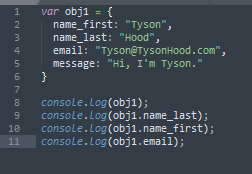
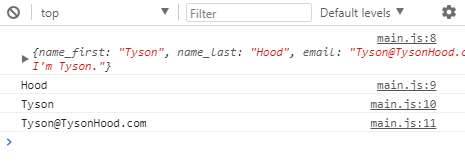
In the case you’re unfamiliar with objects and dot notation and whatnot, let me break it down for you really quick. To define an object, you want to define a var equal to a set of curly brackets. Technically, these brackets are your object. What’s inside are essentially the characteristics of your object and the come in pairs called key-value pairs. Your keys are on your left (and are basically like variables themselves) and your values are on the right (these define your keys).
When you want to call information from an object, you can use something called dot notation. To do this, you take the name of your object (obj1) and add a period, followed by the key you’re trying to retrieve (ex: onj1.email | will print out the value stored for the email key). Get that set up, commit your changes, and let’s move on.
JavaScript Arrays
Apologies to any of you who are very well familiar with this content. I’m pretty solid on these, too, but it’s good practice and seeing as how my brain is still pretty foggy (took me about 8 times to type 2 g’s in foggy), it’s a safe place to start. I think my results will please both parties anyway. I sort of tried some easy concepts and a little more difficult ideas, as well.
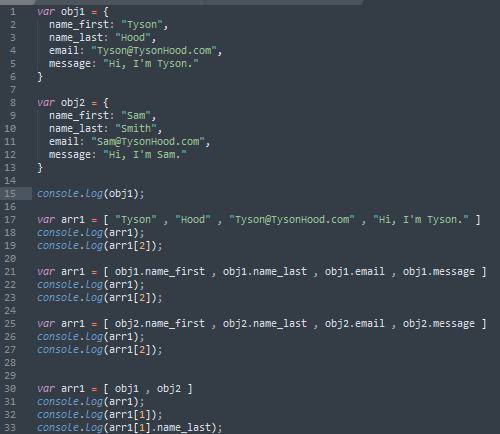
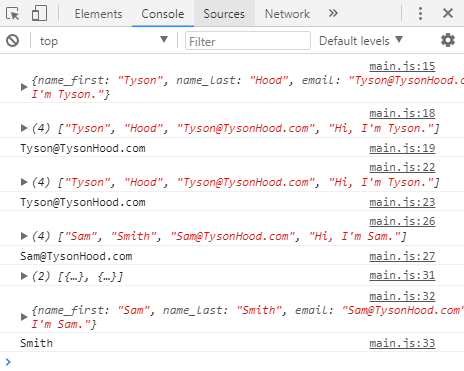
Sublime Text editor makes it so easy to copy code, things often escalate a little quickly. What I did here was create a basic array with all the information I want in it, then logged it to see what I got back. Derp, I know, but it showed me what to do. I needed to create an array with the object keys using dot notation. Upon logging these arrays, I got back the exact same result as I did by just making an object. Furthermore, I made an array with two objects. When logging this for results, you can either call for an index number and get the whole object, or you can use key dot notation and an index and get the value. (ex: arr1[1].name_last | will give us: “Smith” in the screenshot above).
End of the Day
We’re already approaching our hour?! Technically, I think we crossed the mark a little while ago, but with typing and making coffee (it’s brewing), I think it’s a good idea to take a little extra time. I think I’m going to start doing this process a little differently, though, to maximize results on the coding end. I’d like to just code for the pure hour, then come back and write the article. I feel like that’s what you’re SUPPOSED to do, but meh. I’m new to this blogging thing, so I think I deserve some slack cut.
For tomorrow: I think we’re going to have to create some random ID’s for people who are filling out our form (and we’ll have to create a form). We need a way to identify which object people are accessing (For now, we’re not instating security, so it’s just me, not people. It’s just good for the scenario). We can then concatenate that to our string name to make every one person their own object. We’ll probably have to also figure out a way to ensure there are no duplicates. We can then start pushing these objects into an array and setting up our poorly scaled, static (I think it’s going to reset every time we load the page, eh?) database.
Thank you much,
Tyson Hood