
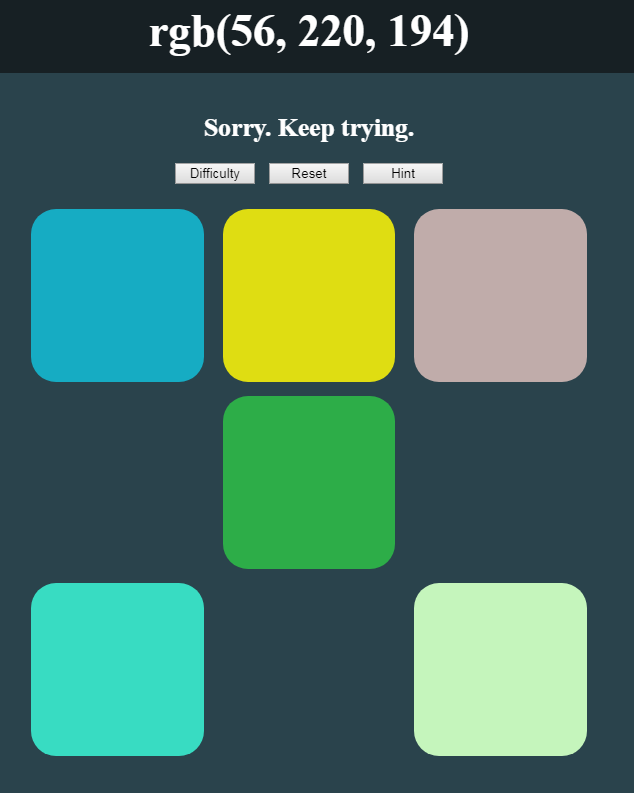
Whether it’s Day 18 or not, it will be from this point forth…
Regardless of how much I have to potentially do today, my JavaScript Practice daily found its spot on the schedule. After this I need to do some client work, peruse corporate jobs for a good fit, secure my residence for the dance weekend, workout, work on a project from a potential employer, respond to emails… I don’t know. There’s probably more. I just know it’s getting heavy and having a major dance event this weekend is kinda killing me.
Quick Day
Quick day in the sense there wasn’t very much to do today. Functionally, we have this game pretty solid, but I wanted to hook up the hint button. After doing so, I added a fun little comment system to make the game a little more friendly (or agitating), also. I’ve decided for now to take out the point system or at least to stall it because I want to get this into my portfolio.

Give Me a Hint
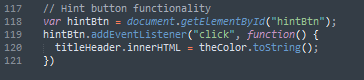
So, the first thing I did was to assign ID’s to the two headers in our HTML. This is to make them more easily target-able. With this set up, I just created a click listener on our hint button. When the button is clicked, change the innerHTML (or text) of the header to a string value for the secret color. You may think this is more than just a hint, but even looking at this, I felt it was tricky to select the correct color.
Friendly Banter
These sections are really short! I don’t know what to do about that because there really isn’t much to say about what I’ve done today.
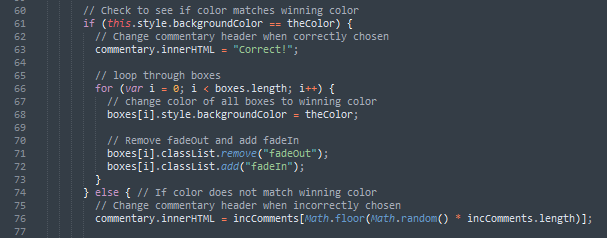
For the friendly banter feature, I wanted to take the “Nope”/”Correct” responses to box clicks out of the console and present them to the user. While doing this, I also decided to make the no-responses more than just “Nope!”, so the user would get a sense that the choice was incorrect and the game hadn’t just stalled (or whatever). To do this, I created an array of responses to send back to the user. I tried to focus on responses which didn’t say something like “close” to prevent the user from thinking they’d almost gotten the right color, if they were actually way off. This will come in handy if the point system does ever get installed.
When an incorrect box is clicked, use the Math libraries to randomly select an indexed response in the commentary array. Then just insert it into the innerHTML of the h3 title within our HTML. When the correct color is chosen, display “Correct!” the same way. Also, put in a reset of the headers at the beginning of the loadGame function for when the reset or difficult buttons are pressed.

And I think that’s it. I may talk to you tomorrow and I may wait till Monday. Until then…
Thank you much.