
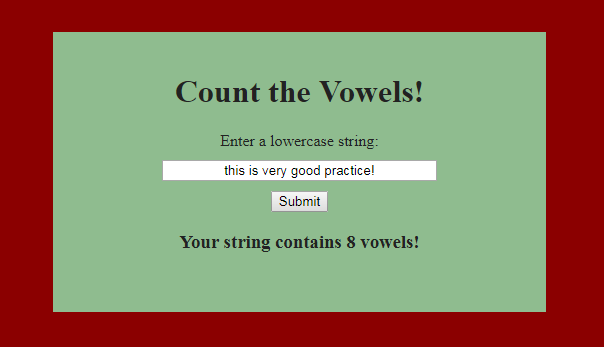
Today marks the start of yet another new challenge. I know we’re still more in the beginner area of JavaScript, but that’s good! It’s getting the JavaScript wheels turning still and it’s also still pre-coffee time, which means our brains are working especially hard (and in my case especially bad- the typing struggle is real!?!). Today’s challenge is to take a given string and count the vowels it. We’re of course going to take it one step further, for practice, and let a user input a string. Luckily… we coded that bit yesterday, so it should be fresh.
Edit: While I was doing this and after I started my coffee, the mental fog had a chance to clear and I realized I was wasn’t really doing this correctly. It still works, but it can be shortened to a more simple way. This is why we practice! I’ve already started the post, so you’re going to get the first and second way. I’ll make sure to highlight the more simple solution.
Split the String
The first thing I want to do personally, is even try to figure out how to get these vowels counted. I Google W3Schools for some info because I know they won’t give me a direct answer to what it is we’re trying to do here. A couple of helpful methods for this are going to be .split and .includes.
Split will take an argument and split a string into an array at that argument. Let’s say our string (var stringy) is equal to “I am a butterfly” (I know, but I’m pre-coffee still). We can say stringy.split(” “); where the argument is a space. Our result will be an array of [“I”, “am”, “a”, “butterfly”]. Also, let it note that this also appears to remove the given argument. I tried to use the argument “b” and I got an array of [“I am a “, “utterfly”].
So anyway, how to we split the string up into each character? W3Schools has a note at the bottom which says if we just say .split(“”), then it will split each character and push them into an array. The resulting array in this case is too long for me to type right now, but you get the idea.


Look for Vowels
This should be a fairly short section. The method .includes() is pretty straight forward, for the most part. How .includes works in this case, is that it’s going to look for a string parameter within whatever string to which we’re tying it. I know what you’re thinking… “This is easy then! Let’s just skip to the front and say stringy.includes(“a”) to search for a’s!”. Believe me, I went straight there, too. Unfortunately, it doesn’t really work like that. Stringy.includes(“a”) when counted only returns 1 (here’s where the fog lifted, but on with the regularly scheduled program for now)… because there’s only on “a” in our string. In the word “am”, a is connected to the “m”, so it’s not just an a.
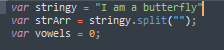
Using the method above, we need to split the string into an array of individual characters and then search through those for our desired character. I saved my array into a var strArr. I also created a var vowels equal to 0 to prime for the next step.
Run the Loop
It would seem most of these practices contain running something through a loop. So here’s ours.
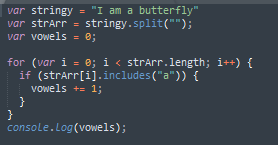
What we’re doing here is starting at 0 and running through a loop as many times as the strArr is long. Then, for each character within the strArr array, we’re checking if it’s an “a”. If it are, add it to the current number of vowels. Then at the end, we’re displaying the total number of vowels found. In this case, the number of a’s in our string is 2.
———– !?!THE REVELATION!?! ———–
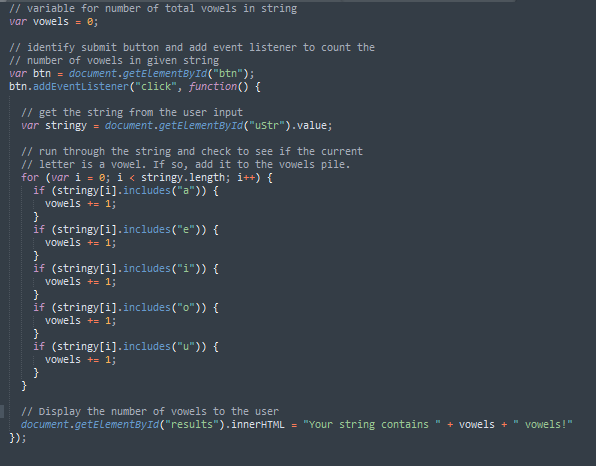
Short section here as we approach the max length for these articles. It’s not really necessary to split the string into an array. Once again, it’s good practice, but not necessary. Within the loop, we can just check if each letter in the string is a vowels. “But you said we couldn’t do that!” I know and I own that, but you can so long as you’re in the loop. Here’s how:
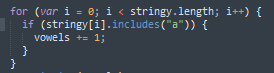
As said above, check if stringy at i is an “a”. If it is, throw it in the pile of vowels. There you have it.
Making It Pretty and Showing It Off
I think you probably know how to do this part. Mine result is shown at the top. Not pretty, but functional, which all that really matters here right now. I also added the user input functionality. Remember, input type=”button”! If you need help doing this, you can check my previous posts. Since there’s only two before this, you shouldn’t have to search for very long. 🙂 The only other thing I did was run more if statements to check for other vowels.
Thank you much.