
Good morning, everyone!
Today, I actually woke up not tired! I mean, I didn’t sleep much because of a west coast swing dance last night, but I had an adrenaline filled morning. The kind that gets you out of bed in a frenzy of quick solution finding because your dog decides to start retching at 8 am. >.< To my approval, surprise, and prayer, I actually got him to use the garbage can. TMI, probably, but I thought you needed to know. 🙂
The code de jour is another short one or two. One is something I really hadn’t done before and the other is filler. I have A LOT of work to do on TysonHood.com 2 Point Oh before my interview Wednesday, so that’s getting the focus, but I thought it important to keep this code habit going.
Drop Down Values
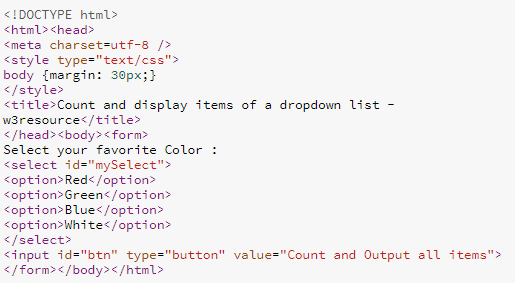
That’s it really. Today’s code is about trying to get to the values in drop down menus. It’s surprisingly easy. The website I use gave me some sample HTML. Though, either the guy writing it or myself is doing something wrong, because his buttons never work. So, I always have to go in and fix them.
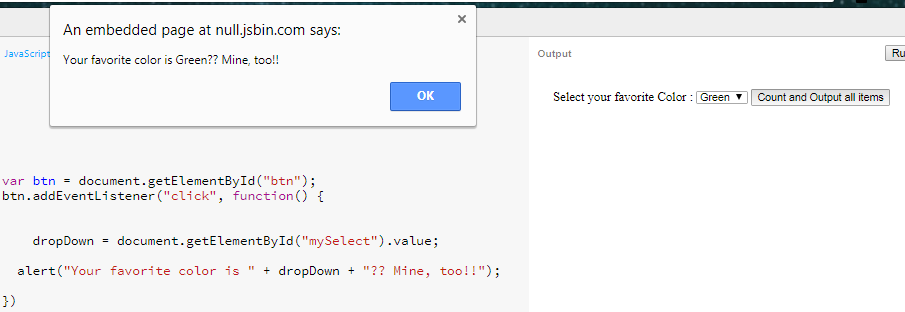
The challenge was to get the value from the drop down menu and display it in an alert. To my surprise, it actually works just like any other input. You’re literally just targeting the input box and getting its value. With it, you create an alert with a cute message and send the user on their way.
The Sphere
Remember math? lol I mean like, remember math when you were growing up? Having to do a million problems every day for topics that baaarely made any sense. You had to make as much sense of it as you could while class was still in session, so you could take it home and do a million more problems for homework? I loved those days. I never did my homework, but still… I was always surprisingly great at retaining the information in math.
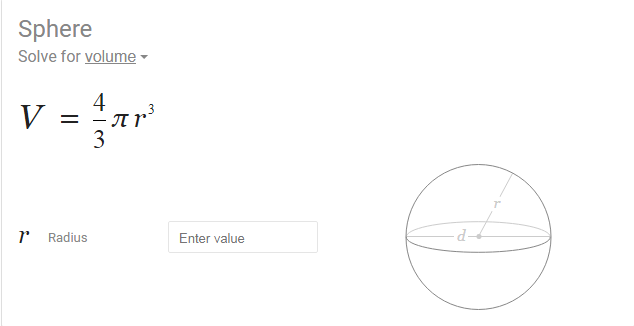
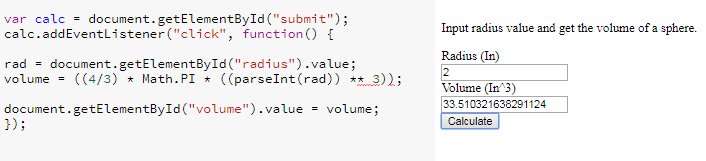
This filler problem kinda takes me back to those days. I had to look up the formula for volume of a sphere, but after that, it was pretty easy. Some sample HTML was given with gave me a rudimentary form with a non-working button, as per usual. I fixed the button and also fancied the labels up a bit, so we would know what kind of data with which we are working. Then I made the volume input “read only”, so there’d be no tampering.
What I came up with is as follows:
And that. Is. It!
That’s all I have for you today. I’m getting a little bit more knowledgeable. I can FEEL IT!?! I like what we have going on here and I’m actually looking forward to what I get to put out tomorrow and in the future. To all of you superstar fictitious readers out there… Have a good, productive day.
Thank you much.