
Bummer! We almost had this finished.
Today, I decided to spend more time on this to try to finish it for all of you out there (in thought) reading this. I got it styled, the functionality finished, and everything for which I could hope… and then I remembered one thing, which was actually conveniently presented to me in the photos for this blog. Can you think of what it is? Let’s start from the top because we have a lot to cover.
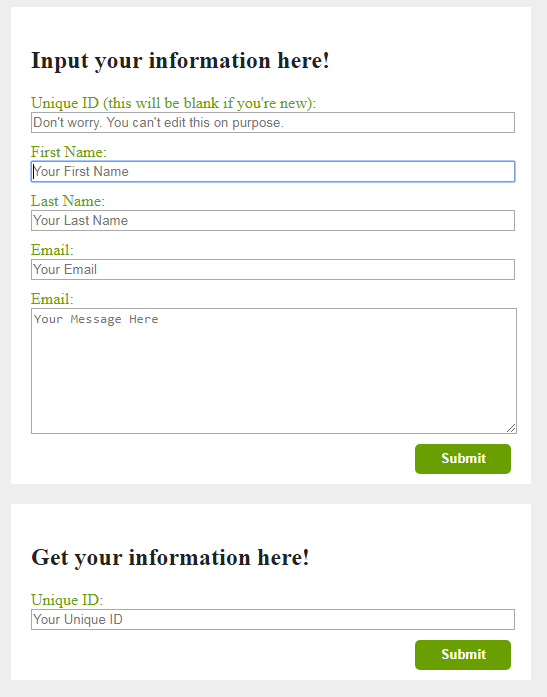
The Input form – New User
What we had left at the end of yesterday were a couple of identified buttons and a ton of console logs. Today, we have much more, so we’re going to break it down into smaller sections, but try (good luck) to keep things brief.
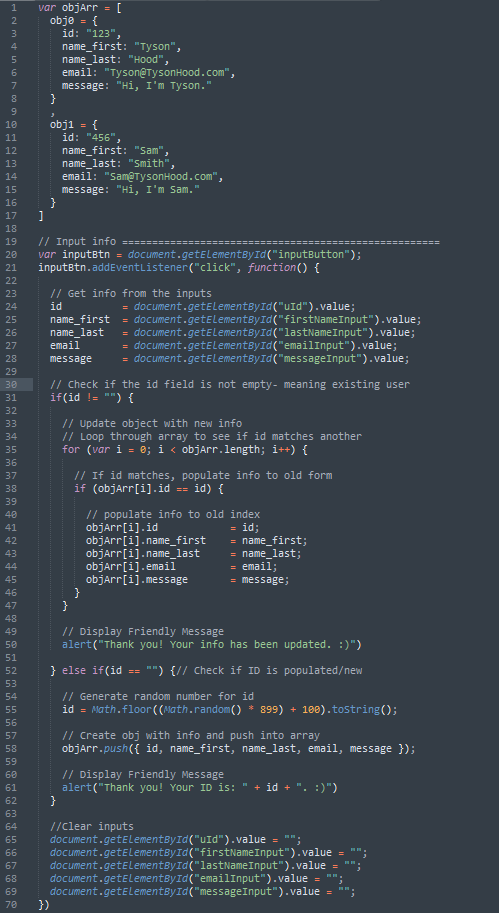
The first thing I decided to do is to get the values from the inputs after the submit button is pressed. I put this right inside the root of the button, because we’re going to use it in a coupla different places. To do this, you just create variables and define them with the values of the input boxes (id = document.getElementById(“uId).value; and so on. If you need more help with why this, you can read about it in my previous post.
Something to note here: name your variables to what you’re array variables are set. I know. DERP! But, I had them originally set to something else, thinking I would mess up the variables within the array. I knew they were local and wouldn’t, but I thought they needed to be a different value when putting them back into the array. Turns out, this just changes the variables of the array. This wouldn’t be bad if we started with a fresh array, but we have example data, so I just went with it.
So, (already halfway through the recommended length of articles!) when we push the submit button, we get the values and then check to see if the unique ID field is empty. We made the unique ID input- readonly- so it’s not editable. If this input IS blank, then the user is a new user. Using the Math.random library, we set up a variable to always equal a 3-digit number… Math.random * 899 will return a value between 0 and 899.(Math.random * 899) + 100 will return a value between 100 and 999.999… So we use Math.floor to round down to the next integer.
With this, we push an object with all the values into the array. Then we display a friendly message and give the user their unique ID (hopefully they write it down), clear the inputs, and send them on their way.
Member Lookup
We’re going to do this now, because without it, the existing member feature wouldn’t even exist. Plus, it’s a relatively short, so it shouldn’t take long.
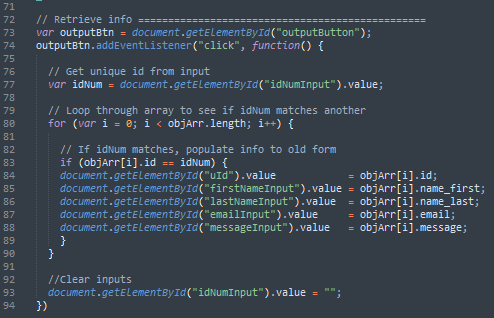
Provided the user actually remembers their unique ID, they can input it and press submit. On the click of the submit button, we take the value they entered and loop through the array, searching for a number which matches that unique ID. When it is found, the information from that object gets setup in the upper form, including filling the once black ID field. See. Short, right?
The Input Form – Existing User
Technically, this would now be, “The Update Form”, but who’s counting? >.<
With all the information now presented to the user, they have the chance to update the information (but not their Unique ID). When they hit submit, we’re going to check if the ID input is empty again. It’s not! So, we’re going to take that value and loop through the array in search of the object with the matching id value. When it’s found, we’re going to update the information of the object at that array index with the new (or old, if they didn’t change it) information. We’ll display a different friendly message, this time about updating, clear the fields, and send the user on their way.
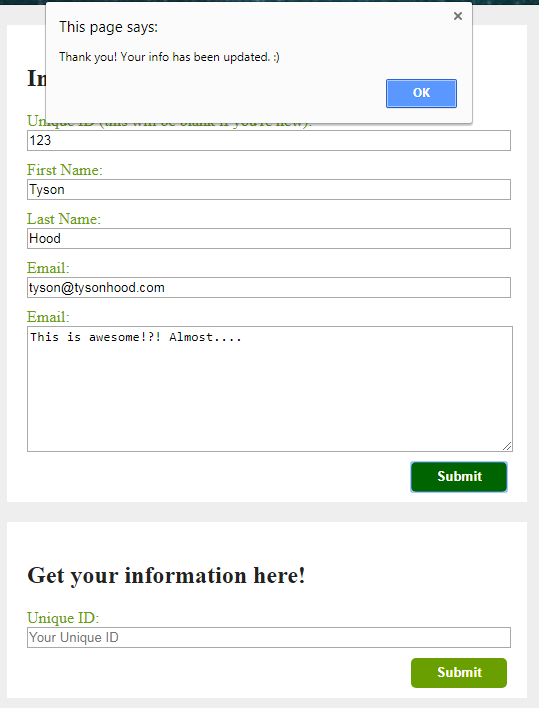
The Bug
Did you figure out the bug? If you did, High Five! If not, no worries. I’m sure there’ll be more chances.
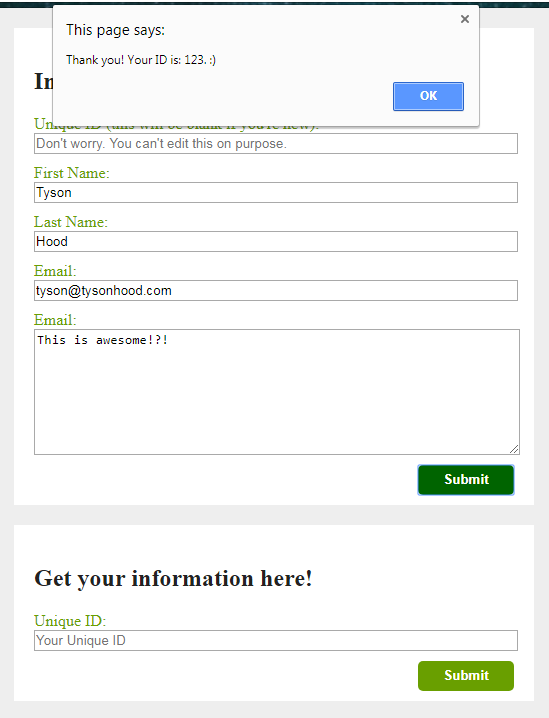
The bug is the unique ID numbers we’re dishing out aren’t necessarily unique. :O While taking the pictures for this post, I got the unique ID of 123, which is the same number as our first example array entry. Even if we blew up our Math.random function to get us 6- or 7-digit numbers, we’re always going to have the potential for a duplicate.
Now, for tomorrow, we’re going to have to fix this instead of start a new project. I know. I’m sorry, but bug fixing is very important and should not be taken lightly. What if this were a dynamic site with very private information and you gave two+ users the same unique ID? You could probably get in a lot of trouble or sued or fined, or who knows what. So until then, take a look at this code and see what you think. I’ll see you’s tomorrow.
Thank you much.