
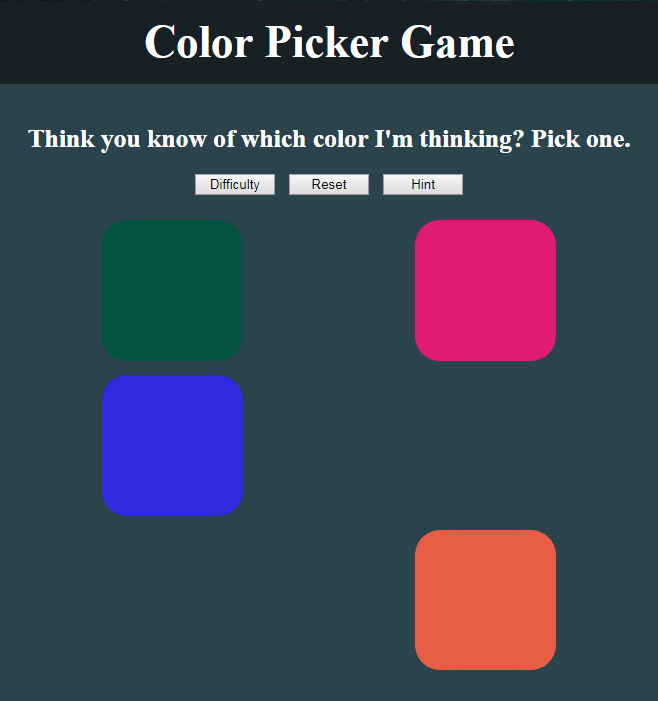
I’ve lost count! Today has been a hell of a day and to top it off, while remembering I needed to post this day’s progress, I see now I’ve mixed up my days. I’ve been under the assumption that it has been Day 16, but I see I already have a day 16 post! So, now I’m not so sure. I feel like it’s too early to get mixed up, but either way, I have to get this post up because there’s A LOT to cover.
I may have worked on the project for more than an hour today, but Demi Lovato (Sorry, not sorry)! Today, I broke everything up into separate functions, created the functionality for the reset button and difficulty button. I didn’t intend to do so much today, but it’s just a really interesting project. I’m really enjoying myself with it and this JavaScript Practice project is turning out great.
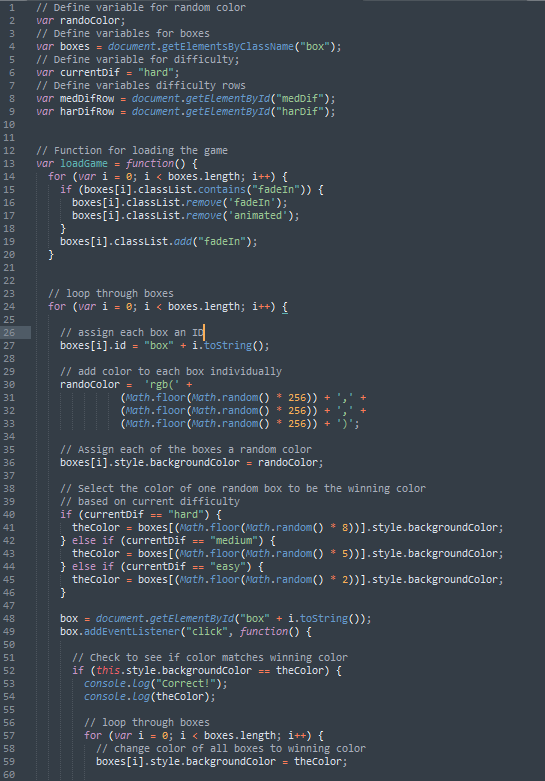
I’m just going to post the whole all the code here and you can open it in new windows and try to follow along. I’m going to *attempt* to keep this short.
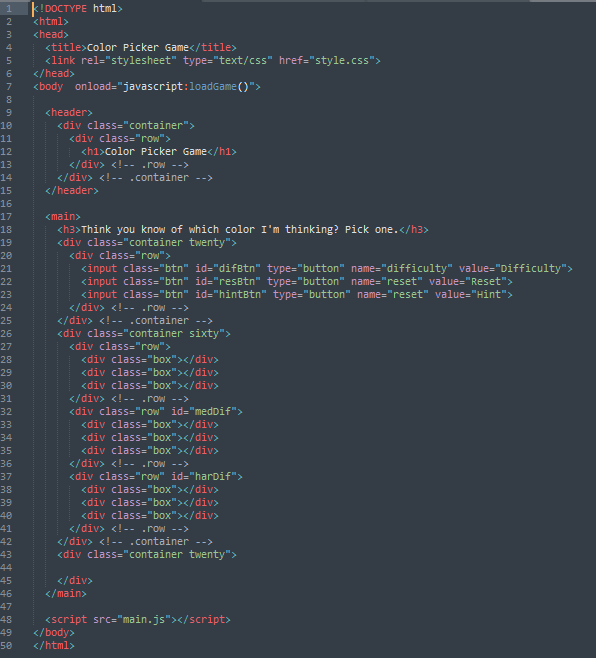
RESET BUTTON
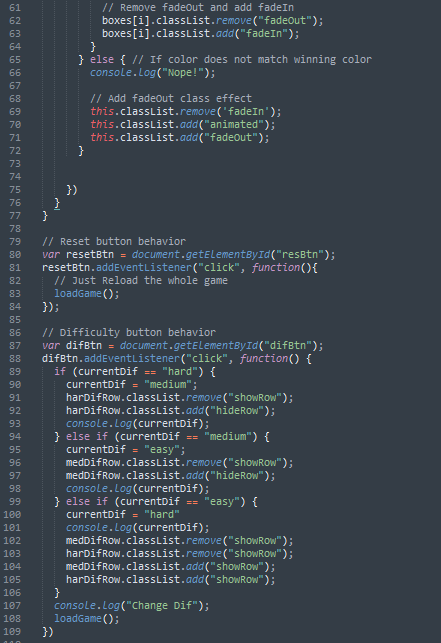
The first thing I did was to make the reset button functional. I originally tried to make it a refresh button and have it refresh the whole page, but if I intend to insert a score function, then that just wasn’t going to work. So, what I came up with was to envelope the code, thus far, in a function called loadGame. Then, I inserted an onload (inline body element in the HTML) so it would run when the page loads. I also threw that function in the click listener for the reset button and voila… The reset button is functional.
The Difficulty Button
For some reason, I felt like the difficulty was turned WAY up while I was trying to code this button. The reason I coded so long today was because I could not figure this out. Though, it turned out to be a little easier than I was making it…. kinda. Also, in doing this, I added another row of buttons to provide an added level of difficulty.
The idea I had in my head was to get rid of a row every time the difficulty button is clicked. My JavaScript can probably be shortened considerably to do that, but check out what I have. I added a coupla classes which essentially toggle the visibility (actually, for future reference, toggling the class will shorten this code) of each row based on the current difficulty. If it’s set to hard and the button is pressed, it will get rid of 3 of the 9 boxes, leaving six. It will do the same for another press and leave 3 boxes. When the button is pressed with 3 boxes showing, it will add the other 6 back, displaying 9 boxes.
This part was relatively easy enough.
The Hard Part
What I got hung up on was trying to make the secret color not extend beyond the number of shown boxes. In that, when I got down to 3 boxes, I could get through all the boxes without picking the secret color. For some reason, I thought this was an effect of the was I chose to display/hide my boxes (originally, I had the display property in the classes to hide/show the rows). What I came up with made me feel a little foolish.
Apparently, I set the secret color code to choose one of six colors. Like, hard coded-ly so. I thought it was selecting based on the boxes.length (this may be a future fix to shorten code), but it’s actually hard coded in there as 5 (array starts at 0). So, all I did was write some if statements to detect the current difficulty setting and select a secret color based on how many boxes are shown.
Tomorrow
I believe that’s it! Today’s JavaScript practice session is in the books. If there’s something I forgot to cover, then please tell me about it in the comments and I’ll go over it. I know I got rid of a lot of console.logs, but I think I got most of it covered otherwise.
Tomorrow is going to be funky and so is the rest of the weekend. Rose City Swing is this weekend and I really want to go to it! I was supposed to compete with Myriah, but I’m not sure that’s happening now. 🙁 I still may go up for a bit, though, which is going to put a strain on my coding schedule. We’ll see. Until then…
Thank you much.